What this is about
If you run Kubernetes, you know the moment: a node has to go, maybe because a spot instance gets reclaimed or a kernel patch is due. Kubernetes then kills the pod and starts it somewhere else. For a game server with fifty players, that means everyone gets kicked.
Paguro changes that. It live-migrates running pods to another node, with their memory, volumes and even open TCP and UDP connections. The application pauses for a moment and then simply carries on.
In plain words
Picture a packed restaurant that has to move to another building. Kubernetes sends every guest out the door, reopens somewhere else and hopes they come back. Paguro moves the restaurant with its guests inside: everyone keeps their table, the food is still there, the conversation goes on. The lights flicker for the blink of an eye. That’s all anyone notices.
Demos first
The video is loaded from YouTube (Google) only when you press play. Privacy · Watch on YouTube
The video is loaded from YouTube (Google) only when you press play. Privacy · Watch on YouTube
That’s all it takes:
# migrate a single pod
kubectl paguro migrate <pod> -n <namespace> --to <node> --wait

# or drain the node: migratable pods are migrated instead of restarted
kubectl drain <node> --ignore-daemonsets
How Paguro works
The trick: the pod on the target node is an ordinary pod. A 2.7 MB wrapper around runc turns its runc create into runc restore. kubelet and containerd don’t notice a thing, and nothing in the node’s runtime stack changes.
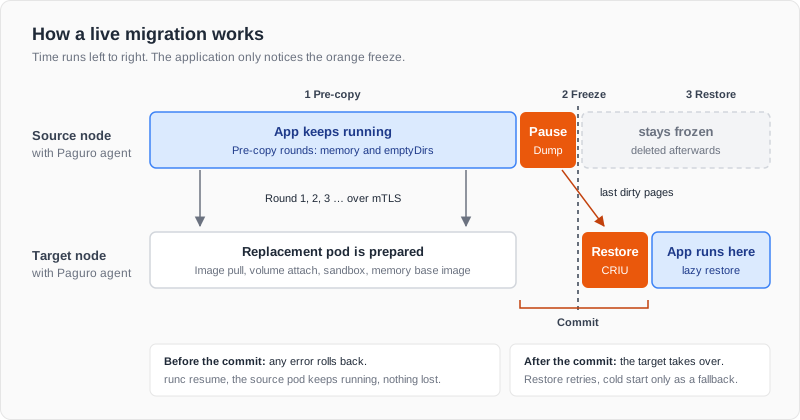
- Pre-copy: the application keeps running while its memory is copied in rounds, with only the changed pages from the second round on.
- Freeze and commit: the container is paused and the last bit transferred. Until the commit, every error ends in a rollback.
- Restore: CRIU starts the process on the target, and missing pages follow via
userfaultfd.
The five hardest problems
The idea is simple, the execution isn’t. These are the five problems live migration usually fails on.
1. A single packet can destroy everything
If a TCP retransmission hits the target pod before its socket is restored, the kernel answers with a RST, and a single RST ends the connection for good. Paguro’s RST shield therefore puts an nftables drop rule into every new network namespace before the CNI even runs. Even a race of a few milliseconds while the namespaces are being created is covered: 0 failures in 500 attempts.
2. Moving the IP: from 55 to 0.6 seconds
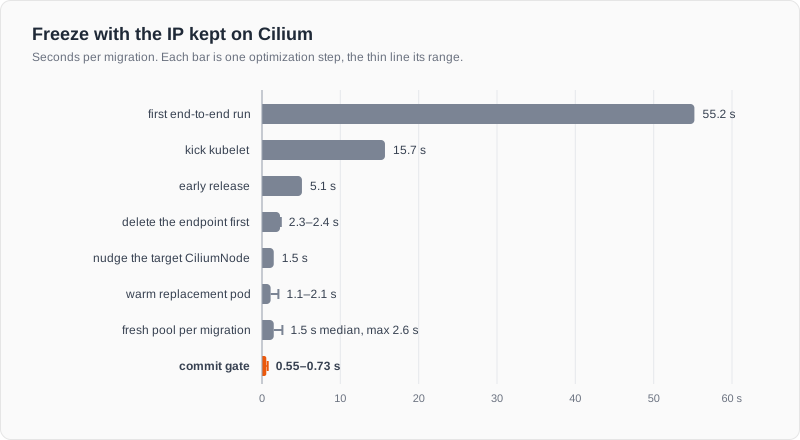
Behind every bar is a mechanism in Cilium or kubelet that I only found in the source code. One example: kubelet retries a failed sandbox only once per second. My first idea was to time the freeze to exactly that rhythm. It sounded logical, but in an A/B test it was slower: 1,731 instead of 1,510 ms. So it was dropped. What worked was a different approach: Paguro binds the replacement pod to the node at exactly the right moment, because a pod’s very first sync doesn’t wait for that rhythm. That’s how the whole project went: every idea gets measured, and whatever doesn’t improve the numbers doesn’t make it in.
Why every millisecond counts: TCP retransmits lost packets after roughly 0.2, 0.6, 1.4 and 3.0 s. A 1.12 s freeze therefore cost the client 1.45 s, a 1.60 s freeze already 3.16 s.
3. Memory that changes faster than you can copy it
Pre-copy transfers memory while the application keeps writing. For a pod with 8 GiB, the rounds shrank from 8,194 MiB to 4 MiB, and the freeze came in at 1.59 s for 8 GiB. On restore, CRIU was the bottleneck: 1.87 s for 1 GiB. With a 13-line CRIU patch and lazy pages, it’s now 104–146 ms.
4. CPUs that aren’t equal
A Python process started on a newer CPU and migrated to an older one crashed right after the restore: at startup, glibc had picked instructions the older CPU doesn’t have. Paguro therefore gives every migratable pod a CPU baseline that glibc, Go, the JVM and friends are limited to from the start. Now the same process migrates in 326 ms, in both directions.
5. Phantom: new address, same connection
Normally, a pod keeps its IP address when Paguro moves it, just like keeping your phone number when you move house. That has two catches: handing the address over takes time, right inside the freeze. And many networks, such as Flannel, Antrea or the AWS VPC CNI, can’t move addresses between nodes at all.
Phantom solves both. The pod gets a new address at its new home, and Paguro makes sure the other side never notices. It works like mail forwarding, only in real time and in both directions: whoever keeps writing to the old address reaches the pod at the new one, and its replies still carry the old sender. The old address belongs to no one anymore; it only lives on as a phantom. Hence the name.
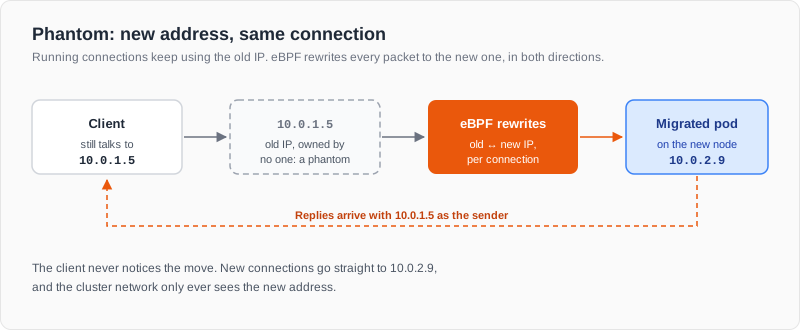
Under the hood, small eBPF programs in the pod’s network namespace do the work. They rewrite every packet of a running connection between old and new IP, exactly per connection, while new connections go straight to the new address. Because the new pod is fully ready before the freeze, the freeze drops to 0.3–0.9 s. And live migration now works on networks that can’t move IPs at all.
Four CNIs, one result
Every CNI had its own trap, from Cilium’s eBPF load balancer to Antrea’s Open vSwitch. After the fixes, not a single connection is lost, whether the client uses the pod IP, the service or a NodePort from outside:
| CNI | Lost connections | Freeze |
|---|---|---|
| Flannel | 0 | 338–635 ms |
| Cilium | 0 | 339–491 ms |
| Antrea | 0 | 354–609 ms |
| Calico | 0 | 356–904 ms |
The ultimate test: game servers
Game servers have no failover: players send 30 inputs per second over UDP, and the server keeps their sessions in memory. UDP brought four traps of its own, and Paguro defuses all of them. In a test with five back-to-back migrations, inputs were lost only during the 0.6 s freeze, there was no session reset, and all 625 newly joining players got in.
The real-world test with Minecraft Java (TCP) and Minecraft Bedrock (UDP), eight bots each, playing and chatting. On all five clusters, not a single player lost the connection:
| Cluster | Freeze Java (TCP) | Freeze Bedrock (UDP) |
|---|---|---|
| Cilium (lab) | 1.1 / 1.75 s | 0.77 / 0.85 s |
| Calico (lab) | 1.9–2.7 s | 1.45–1.57 s |
| Flannel (lab) | 1.3 / 1.5 s | 0.48 / 0.51 s |
| Antrea (lab) | 1.2 / 4.0 s | 0.53 / 0.53 s |
| Amazon EKS | 0.61 / 0.66 s | 0.44 / 0.47 s |
Storage, cloud and chaos
Volumes without data loss. The pod’s data moves along too. Paguro copies it ahead of time, so the freeze only carries what changed at the very end. In a stress test, a 25 GiB volume being written to every 100 ms moved over: not a single entry was missing.
Cloud, Karpenter and spot. When a node is drained, for example by Karpenter or a spot interruption, Paguro migrates the pods automatically instead of restarting them:
| Disruption | Result |
|---|---|
| drift (new node first, then drain) | 651 ms freeze, 0 disconnects |
| drift from on-demand to spot | 549 ms freeze, 0 disconnects |
| NodeClaim deleted | 531 ms freeze, 0 disconnects |
| spot interruption warning | 0.53–0.70 s freeze, done before AWS terminates the instance |
Chaos tests. A test script kills controllers and agents in the middle of a migration. Every run ended either in a clean rollback or a successful migration, never with a duplicate or frozen pod. Even a helm upgrade in the middle of a Minecraft migration went through without a disconnect.
What Paguro can do today
- Live migration of memory, files and volumes
- IP preservation on Cilium and Calico, Phantom for every network that can’t move IPs (Flannel, Antrea, the AWS VPC CNI and more)
- Automatic migration on
kubectl drain, Karpenter, the Cluster Autoscaler and spot interruptions - Agones integration for game servers
- Encrypted transfer between nodes, installation with a Helm chart
Key learnings
- Measure, don’t assume. I thought the 1 GbE cable was the bottleneck. A direct 10G link showed that even two VMs on the same host only reach 5–6 Gbit/s. The bottleneck was virtualization, not the cable.
- Optimize for what the user feels. What counts isn’t the freeze, but how long the client waits. That’s why Paguro always measures at the client too.
- Make silent failures loud. Since Go 1.24, every Go server opens MPTCP sockets that CRIU can’t migrate. Paguro now detects that before the freeze and says clearly what to do.
You run game servers, spot fleets or jobs that can’t afford a restart? Let’s talk: david@picillo.de