What this is about
In most enterprises, the truth about identities still lives in Active Directory. Meanwhile, modern applications have long since standardized on OIDC or SAML — protocols that AD doesn’t natively offer. Maintaining two user stores isn’t an option. This is where Keycloak in front of AD comes in: Keycloak federates against the existing AD, takes over the role of Identity Provider, adds MFA, and delivers the protocol coverage that AD alone will never provide.
Setup goal: AD remains the source of truth. Keycloak reads users from AD, speaks OIDC/SAML with modern applications, layers MFA on top when needed — and, depending on requirements, also runs in WRITABLE mode if users should change passwords through Keycloak.
This article targets Keycloak 26. The admin UI has changed significantly since v19; older versions display some fields under different names.
Architecture overview
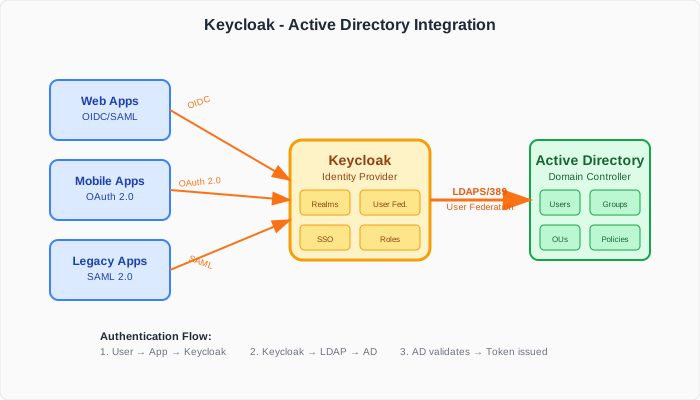
- Applications talk to Keycloak exclusively via OIDC or SAML 2.0 — they know nothing about LDAP or AD.
- Keycloak handles authentication, issues tokens, layers MFA, and manages sessions.
- Active Directory is the user database. Keycloak accesses it via LDAPS, validates passwords there, and reads attributes and groups.
- An IGA system like Saviynt can sit above this and own the lifecycle management of the AD identities — transparent to Keycloak.
Preparing AD
Before anything in Keycloak is clickable:
- Create a dedicated service account in AD (e.g.
keycloak-svc). - Delegate read access to the user and group OUs. For READ_ONLY, that’s enough.
- If WRITABLE is planned: additionally grant Write permission on the relevant user attributes plus a Reset Password delegation on the OU.
- Export the CA certificate of the domain controller — you’ll need it for the LDAPS truststore in Keycloak.
- Plan for failover: at least two DCs, so a DC reboot doesn’t take down the whole IdP.
Tip: exempt the service account from regular password expiry. Otherwise the bind eventually fails and nobody finds out why.
Step 1 — Create the User Federation provider
In the Keycloak Admin Console:
Realm → User Federation → Add LDAP providers
The key fields at the top:
Vendor: Active Directory
This is step zero. As soon as Active Directory is selected as the vendor, Keycloak auto-populates all AD-specific defaults — UUID attribute set to objectGUID, object classes set to person, organizationalPerson, user, and the msad-user-account-control-mapper is created automatically. Skip this and you’ll wire everything up by hand.
Connection URL: ldaps://dc1.example.com:636 ldaps://dc2.example.com:636
Bind Type: simple
Bind DN: CN=keycloak-svc,OU=Service Accounts,DC=example,DC=com
Bind credentials: <service-account-password>
Notes:
- Multiple DCs separated by spaces → Keycloak fails over automatically. One of the most important and most commonly forgotten settings.
- LDAPS:636 instead of plain LDAP:389. Never plain in production.
- Truststore: for self-signed CA certs, put the AD CA into a PKCS12 truststore and reference it via
KC_TRUSTSTORE_PATHS— otherwise the TLS handshake fails withPKIX path validation failed.
Click Test connection and Test authentication — both must turn green before anything else is configured.
Step 2 — Edit Mode: READ_ONLY or WRITABLE?
This decision is made at creation time and should not be changed later. The mappers are generated to match the Edit Mode at creation time.
READ_ONLY — Keycloak reads, never writes back.
- Use when: AD has its own self-service portal (e.g. a tool through which users reset their password), or an IGA like Saviynt owns the lifecycle management.
- User experience: password resets and profile updates happen exclusively outside of Keycloak.
- Benefit: crystal-clear responsibility — AD is master, Keycloak is pure IdP.
WRITABLE — Keycloak may write back.
- Use when: users should change their password or maintain profile fields directly in Keycloak (e.g. via Account Console).
- Requirements: the service account needs the “Reset Password” delegation; the AD password policy must align with the Keycloak realm policy (otherwise a password set in Keycloak will be rejected by AD).
- Risk: two write paths to the same identity — audit trails become less clear.
UNSYNCED — special case: AD is hard read-only (owned elsewhere), but Keycloak should still let users edit local data. The changes only live in Keycloak and must be synced back externally. Rarely useful.
In setups where an IGA owns the lifecycle, READ_ONLY is the right choice. Where users are supposed to change their passwords in Keycloak’s self-service, WRITABLE is more honest than placing yet another self-service portal in front of it.
Step 3 — LDAP settings in detail
Users DN:                OU=Users,DC=example,DC=com
Username LDAP attribute: sAMAccountName
RDN LDAP attribute:      cn
UUID LDAP attribute:     objectGUID
User Object Classes:     person, organizationalPerson, user
User Search Filter:      (objectClass=user)
Notes:
- Users DN: default AD places users under
CN=Users. Many organizations move users into a dedicated OU. Enter what actually exists in AD — subtree search is the default. - Username LDAP attribute: classically
sAMAccountNamefor the domain username (john.doe). Depending on AD usage,userPrincipalName(john.doe@example.com) may be the better fit — for example when applications expect login in email format. Decide once and stay consistent; switching later confuses existing sessions and mappers. - objectGUID is binary — Keycloak encodes it correctly on storage, no manual conversion needed.
- User Search Filter is optional, but useful on large ADs, e.g. to filter out disabled accounts:
(&(objectClass=user)(!(userAccountControl:1.2.840.113556.1.4.803:=2)))
Connection block:
Enable StartTLS:     false   (LDAPS is already TLS, no StartTLS needed)
Use Truststore SPI:  Always
Connection Pooling:  true
Connection Timeout:  5000
Read Timeout:        10000
Pagination:          true
Cache Policy:
Cache Policy: MAX_LIFESPAN
Max Lifespan: 180000     (3 minutes in ms)
Recommendation: MAX_LIFESPAN with 3 minutes strikes a good balance. Without caching, Keycloak hits LDAPS on every token issuance — with many short-lived sessions (service tokens, frequent refreshes), this causes a flood of LDAPS requests on the DCs. 3 minutes of cache keeps bind throughput low without noticeably delaying group membership changes.
For extremely volatile groups, NO_CACHE is possible — but costs visibly in performance. The default (DEFAULT, 1h TTL) is usually too long for modern authentication load.
The Import Users gotcha
With Import Users set to On (default), Keycloak writes users into its own DB and lowercases username and email during import. A user named John.Doe in AD lands as john.doe in Keycloak — login still works (sAMAccountName is case-insensitive), but API lookups with the original case fail. To avoid that, turn Import Users off — but you then lose local profile storage.
Step 4 — Sync strategy
Periodic Full Sync:          true         (daily, catches deletions & drift)
Full Sync Period:            86400        (24h)
Periodic Changed Users Sync: true
Changed Users Sync Period:   3600         (hourly)
Batch Size:                  1000
Recommended pattern:
- Click Synchronize all users once after creating the provider (initial full sync).
- Enable Periodic Changed Users Sync hourly — transfers only changes since the last run, keeping Keycloak near real-time in sync.
- Additionally run Periodic Full Sync once daily (ideally at night) — catches edge cases that changed-users-sync misses reliably: deleted accounts, manually reset attributes, drift from external tools or IGA writes against AD.
On very large ADs (>100k users), bump batch size to 1000-5000 and keep AD’s MaxPageSize (default 1000) in mind.
Step 5 — Configuring mappers
As soon as Vendor=AD was selected at creation time, Keycloak created these mappers automatically:
username→sAMAccountNameemail→mailfirst name→givenNamelast name→sn- msad-user-account-control-mapper ← AD-specific, critical
Why the MSAD mapper is essential
The mapper reads two AD attributes and translates them into Keycloak behavior. Both are security-relevant.
1. Account enabled or disabled — attribute userAccountControl
userAccountControl is a bitmask where AD stores the account state. The relevant bit for “account disabled” is 0x2. An active normal user typically has value 512, a disabled account 514 (= 512 + 2).
- With mapper: accounts disabled in AD are marked as
disabledin Keycloak, login is blocked. - Without mapper: Keycloak continues to accept logins from accounts disabled in AD — a classic security hole.
2. Password reset required — attribute pwdLastSet
pwdLastSet holds the timestamp of the last password change. If an AD admin sets it to 0, AD interprets it as: “user must change password on next login”.
- With mapper: Keycloak triggers the Update Password required action on next login.
- Without mapper: the AD admin’s reset intent is ignored; the user continues to log in with the old password.
Both behaviors are enabled by default as soon as Vendor: Active Directory was chosen at provider creation. Disabling or deleting this mapper means losing those security properties.
Group LDAP Mapper
Create a new mapper for AD groups:
Name:                            ad-groups
Mapper Type:                     group-ldap-mapper

LDAP Groups DN:                  OU=Groups,DC=example,DC=com
Group Name LDAP Attribute:       cn
Group Object Classes:            group
Preserve Group Inheritance:      false
Membership LDAP Attribute:       member
Membership Attribute Type:       DN
Membership User LDAP Attribute:  cn

Mode:                            READ_ONLY
User Roles Retrieve Strategy:    LOAD_GROUPS_BY_MEMBER_ATTRIBUTE_RECURSIVELY
Drop non-existing groups during sync: true
Important — nested groups: AD uses nested groups heavily. The retrieve strategy LOAD_GROUPS_BY_MEMBER_ATTRIBUTE_RECURSIVELY resolves transitive memberships correctly by issuing recursive LDAP queries — but at a noticeable performance cost on deeply nested structures or large ADs. Preserve Group Inheritance should still be set to false in AD setups — AD’s group topology doesn’t fit Keycloak’s hierarchical group-tree model.
From group to role
group-ldap-mapper imports groups — it doesn’t assign Keycloak roles. The workflow is:
- AD group
App-Adminsexists → imported via the group mapper as Keycloak groupApp-Admins. - In Keycloak:
Groups → App-Admins → Role mappings → Realm Role adminis assigned. - Any user who lands in
App-Adminsthrough AD sync automatically inherits theadminrole.
This keeps role authority in Keycloak while membership comes from AD. Exactly the pattern you want: assigning roles is a Keycloak responsibility, knowing who belongs to which group is an AD responsibility.
Step 6 — MFA via authentication flows
This is where the real value of putting Keycloak in front of AD comes through: MFA for all applications, without introducing MFA infrastructure into AD itself.
The standard Browser Flow in Keycloak 26 already includes a Browser - Conditional 2FA subflow with OTP. Users who have OTP configured are automatically prompted at login — no flow changes required. What you typically want to add:
Make MFA mandatory (for all or specific groups)
For all users:
- Set
Authentication → Required Actions → Configure OTPtoDefault Action. Keycloak then forces OTP setup on first login for every new user.
For specific AD groups only (e.g. only Admins):
- Duplicate the browser flow (e.g.
browser-ad-mfa). - In the new flow, add a
Condition - User Rolewith the desired realm role before theConditional 2FAsubflow. - Switch the
OTP Formstep fromConditionaltoRequired. - Set
Authentication → Bindings → Browser Flowto the new flow.
WebAuthn / passkeys instead of TOTP
In modern setups, replace OTP with FIDO2/passkeys:
- Enable
Authentication → Required Actions → Webauthn Register Passwordlessand set it toDefault Action. - In the browser flow, replace the OTP authenticator with
WebAuthn Authenticator(two-factor) orWebAuthn Passwordless(passwordless login).
What you gain
- MFA for every application that goes through Keycloak — legacy apps included (SAML), modern apps (OIDC), CLIs (Device Flow).
- AD password policy stays untouched, MFA logic lives entirely in Keycloak.
- Step-by-step migration to passkey-only is possible without AD changes.
- Self-service for users via the Account Console (
/realms/<name>/account).
Pitfalls from practice
- Self-signed CA: without
KC_TRUSTSTORE_PATHS(or the matching Quarkus config key), Keycloak throwsPKIX path validation failed. Put the AD CA into a PKCS12 truststore and reference it. - Service account lockout: testing bind credentials in a wrong Keycloak config can lock out the service account in AD. Watch AD’s account lockout policy.
- Username/email case on import (see Step 3) — especially painful in API integrations.
- Changing Edit Mode after the fact: doesn’t work reliably. Delete the provider and recreate is safer.
Pagination: falseon large ADs: AD’sMaxPageSizedefaults to 1000. Without pagination, anything beyond that simply isn’t returned.- Failover URL not set: a single DC reboot takes down the IdP. Always configure two DCs.
- Nested groups: set
Preserve Group Inheritance: false. Withtrue, Keycloak tries to mirror the AD group hierarchy 1:1 as a nested group tree, which doesn’t map cleanly to AD’s topology. Withfalse, all groups are imported flat and users are added directly as members of each group — transitive resolution is then handled by the recursive retrieve strategy.
Troubleshooting
For problems, set Keycloak server logs to TRACE for the LDAP category:
quarkus.log.category."org.keycloak.storage.ldap".level=TRACE
Common symptoms:
Test connectionfails → firewall (port 636) or truststore issue.Test authenticationfails → wrong Bind DN, or service account locked out; verify vialdapsearchdirectly from the Keycloak host.- Sync runs through but no users in Keycloak → Users DN wrong or search filter too restrictive.
- Groups not imported → wrong LDAP Groups DN; service account lacks read access on the group OU; wrong
Group Object Classes(in AD it’sgroup, notgroupOfNames). - User status ignored (disabled AD user can still log in) → MSAD User Account Control Mapper missing or disabled.
For connection-pool issues:
com.sun.jndi.ldap.connect.pool.debug=all
Conclusion
Putting Keycloak in front of AD isn’t an end in itself. There are three concrete benefits:
- AD stays the source of truth, without modern apps needing to know — they speak OIDC/SAML with Keycloak, and that’s it.
- An MFA layer for legacy and cloud apps alike, without introducing MFA infrastructure into AD itself.
- Clean separation between the authentication layer (Keycloak) and the identity-lifecycle layer (AD/IGA like Saviynt).
The setup itself is manageable — the real value lies in deliberate choices around Edit Mode, MSAD mapper, sync strategy, and MFA flow. Get those four levers right and you have an IdP that carries for years and migrates smoothly toward passkey-only or away from AD entirely.